Internal Tool, Visuals are representative
VetCar24 Staff App
A native Android app for the VetCar24 team that covers bookings, customers, messaging, analytics and blog management, and works fully offline.
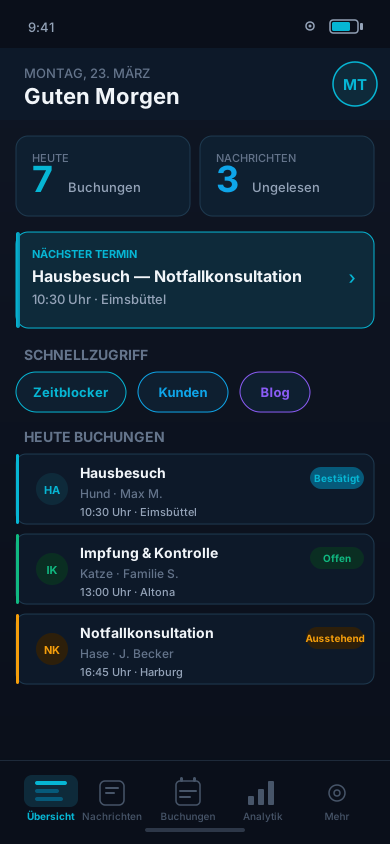
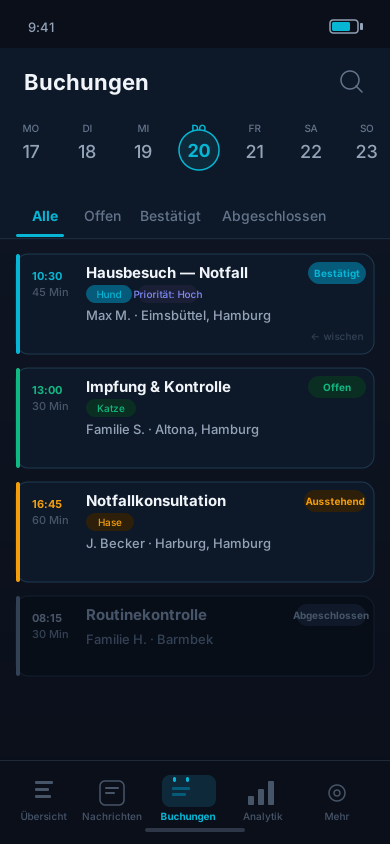
Internal business tool. At the client's explicit request, every visual here is a representative mockup without real customer data.
Privacy & Confidentiality
This app is an internal business tool that belongs to the client. The visuals on this page are representative illustrations, not real app screenshots, and contain no real customer data. We show only the architecture, tech stack and feature scope.
Mockups
Representative views
Feature scope
The tools a mobile veterinary team uses day to day.
-
Dashboard
At-a-glance overview: today's bookings, next appointment, unread messages, quick actions
-
Booking Management
Week calendar strip, filter by status, swipe to cancel or complete, real-time status updates
-
Customer CRM
Full customer profiles, booking history, notes, per-booking messaging thread
-
Message Inbox
Real-time messaging between customers and the practice, one thread per booking
-
Analytics
Revenue charts, booking statistics, period-over-period comparisons, all data cached locally
-
Blog Editor
Rich text editor on mobile: write articles with SEO settings and publish them straight to vetcar24.de
-
Time Blocker
Block time slots, set vacation days or breaks, and the booking system picks up the change right away
-
Permission System
Owner and staff roles with rights per feature: who sees what and who can edit what
-
Offline Mode
Works without a network: SQLite cache, action queue and automatic sync on reconnect
-
Biometric Lock
Automatic app lock after inactivity, unlock via fingerprint or Face ID
-
Push Notifications
Push alerts for new bookings, messages and cancellations via Expo + Firebase
-
Staff Management
Invite team members, assign roles, manage access, all from mobile
Tech Stack
in detail
-
React Native 0.86
Real native Android components instead of a WebView
-
Expo SDK 57 + Router
Expo Router with file-based navigation, local Gradle builds, app updates as APKs through a private release channel
-
TypeScript 6
Strict mode and branded types, typed end to end
-
Cloudflare Workers, D1, R2
Auth, real-time updates, file storage. On Cloudflare since October 2026, previously Supabase
-
expo-sqlite + Drizzle ORM
Local SQLite database with a sync engine, so the app works offline
-
TanStack Query v5
Query persistence via AsyncStorage, optimistic updates, background sync
-
Reanimated 4 + Moti
Animations run as worklets on the UI thread, with spring physics and layout transitions
-
TipTap Editor
Rich text editor inside the app for writing and publishing blog posts on mobile
-
Victory Native + Skia
GPU-accelerated analytics charts with React Native Skia
-
Firebase Crashlytics
Real-time crash reporting, performance monitoring, stack traces
-
expo-local-authentication
Biometric unlock: fingerprint or face recognition
-
MMKV + Zustand 5
Synchronous native key-value store for local settings, global state with Zustand
Development
Phase by phase
- 01
Analysis & Architecture
Week 1-2- Requirements workshop with client
- Workflow analysis
- Tech stack decision
- Database schema & API design
- 02
Auth & Core
Week 3-4- Auth + Google Sign-In
- Biometric unlock
- Navigation with Expo Router v6
- Permission system (owner/staff)
- 03
Bookings & Customers
Week 5-7- Booking list with calendar strip
- Status management with swipe gestures
- Customer CRM & booking history
- Per-booking messaging with Realtime
- 04
Offline & Sync
Week 8-9- expo-sqlite + Drizzle ORM setup
- Action queue for offline operations
- Conflict resolver for sync conflicts
- TanStack Query persistence adapter
- 05
Advanced Features
Week 10-12- Analytics dashboard with Skia charts
- TipTap blog editor on mobile
- Time blocker modal
- App update system with private APK releases
- 06
Testing & Deploy
Week 13-14- Firebase Crashlytics integration
- Performance profiling (Skia + FlashList)
- APK build via Gradle
- Internal release process
Offline architecture
SQLite Cache
expo-sqlite + Drizzle ORM keep all critical data on the device, so the app stays fully usable without a network connection.
Action Queue
The app buffers mutations in a local queue and syncs them with the backend once the connection is back.
Conflict Resolver
Optimistic updates with server-side validation. The resolver settles conflicts with a last-write-wins strategy and supports rollback.